How to Attach the Control Box to an Adjustable Base?

Attaching the control box to your adjustable base is a Attaching the control box to your adjustable base is a straightforward process.straightforward process. You’ll typically use the provided mounting hardware to secure it in place. This ensures your base functions correctly and all the wiring stays organized.
Many adjustable bases have a designated spot for the control box. It’s often near the head or foot of the frame. Following the manufacturer’s instructions is key for a secure attachment. We found that having the right tools makes this job even easier.
- Locate the control box and mounting hardware.
- Identify the designated mounting area on your base.
- Secure the box using screws or clips.
- Connect all necessary cables to the box.
- Test the base to ensure it works properly.
Let’s walk through exactly how to attach your adjustable base control box step by step. It’s simpler than you might think!
Attaching the control box to your adjustable base is an Attaching the control box to your adjustable base is an important step, and understanding features like zero gravity can enhance its use.important step. It’s where all the wiring connects to make your bed move. Most bases come with everything you need. You just need to know where it all goes. We’ll guide you through making sure it’s connected correctly and securely.
Mounting Your Adjustable Bed Control Box
Securing the control box properly is key for smooth operation. This little box is the brain of your adjustable base. It receives signals from the remote and tells the motors what to do. A loose control box can lead to connection issues or damage over time. Let’s get it attached so your bed can reach its full potential.
Gathering Your Supplies
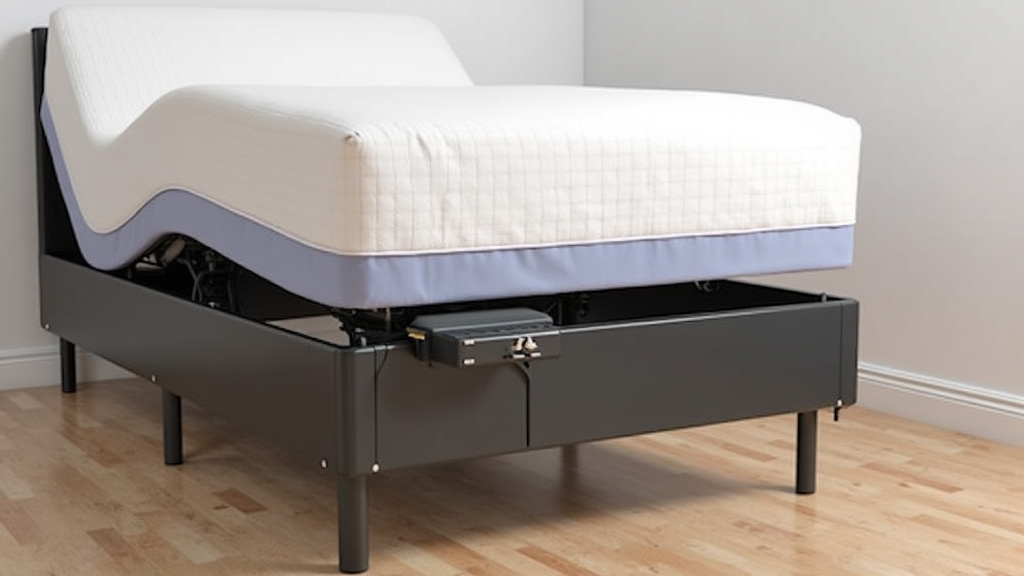
Before you start, let’s make sure you have everything ready. This will make the process go much faster. You don’t want to be searching for a screw halfway through. Check that you have the control box itself. It usually looks like a black plastic rectangular unit. Then, find the mounting hardware. This typically includes screws or sometimes plastic clips. Your adjustable base owner’s manual is also a helpful friend here. It will have specific details for your model. If you can’t find it, many manufacturers have them online.
Locating the Designated Mounting Area
Most adjustable bed frames are designed with a specific spot for the control box. This spot is usually on the underside of the frame. It’s often near the head of the bed, but sometimes it’s closer to the foot. Look for pre-drilled holes or a marked area. Some frames have a small bracket already attached. Other times, you’ll need to create your own mounting points. We found that examining the frame carefully is the best way to spot this location. Your manual will be the ultimate guide if you’re unsure.
Checking the Frame for Mounting Points
Take a good look at the metal frame of your adjustable base. Can you see any small holes that seem ready for screws? Are there any plastic tabs or clips already in place? These are your mounting points. If you see nothing obvious, don’t worry. Some bases allow you to screw directly into a thicker part of the frame. Just be sure you’re not drilling into a wire or motor component. Always err on the side of caution.
Consulting Your Owner’s Manual
Your owner’s manual is your best friend for this task. It will show you exactly where the control box should go. It often includes diagrams or pictures. This is especially helpful if your frame looks different than expected. We found that even simple bases have a specific spot. Following these instructions ensures you don’t void any warranties. It also makes sure the wiring has enough slack for the bed to move.
Attaching the Control Box: Step-by-Step
Now for the actual attachment. This part is usually pretty quick. The goal is to get the box firmly secured. A vibrating bed can loosen a poorly attached box over time. We want to prevent that. So, let’s get it snug.
Using Screws for a Secure Fit
If your base uses screws, you’ll typically screw them through the control box or a mounting bracket into the frame. Some control boxes have holes in them that align with holes on the frame. Others come with a separate mounting plate. Line up the holes on the plate with your frame’s pre-drilled holes. Then, secure the plate with the provided screws. Once the plate is on, you can attach the control box to it. If there are no pre-drilled holes, you might need to gently create them. Make sure the screws are the right size and length. You don’t want them to poke through the other side of the frame.
Employing Clips or Brackets
Some manufacturers prefer using clips or integrated brackets. These can be faster than screws. You might have plastic clips that snap into place on the frame. Then, the control box slides or snaps onto these clips. Other bases might have a metal bracket welded to the frame. You then attach the control box to this bracket. Check your manual to see how these specific pieces work. They are usually quite intuitive once you see them. Ensure they click or snap firmly into position.
Connecting the Wires to the Control Box
This is where the magic happens. All the cables from your motors, remote, and any accessories need to connect here. It’s like plugging in all the components of a computer. Most ports are labeled or shaped uniquely. This makes it hard to plug things in incorrectly. We found that laying out all the cables first helps.
Identifying Motor and Remote Connections
You’ll typically see several ports on the control box. Two main ports will be for your bed’s lift motors. These often look similar. There will also be a port for your remote control. Some boxes have additional ports for things like under-bed lighting or massage features. Look for labels like “Motor A,” “Motor B,” “Remote,” or symbols that represent these. Your manual will have a diagram of each port and what it’s for.
Ensuring a Snug and Correct Connection
Push each cable firmly into its designated port. You should feel a slight click or resistance when it’s fully seated. Wiggle the cable gently to ensure it’s secure. A loose connection here is a common reason for an adjustable base not working. Double-check that you haven’t mixed up the motor cables, though most are designed to prevent this. The remote cable is usually distinct.
Securing Loose Wiring
Once everything is plugged in, you’ll have some leftover cables. It’s important to manage these. Loose wires can get caught in the moving parts of the base. This can cause damage to the wires or the motors. Most bases come with zip ties or velcro straps for this purpose. Gather the excess cables together. Use the provided ties to bundle them neatly. Secure the bundles to the frame so they don’t hang down. This keeps your setup clean and safe.
Final Checks and Testing
You’ve attached the box and connected the wires. Great job! Now it’s time for a quick test run. Make sure the bed is plugged into the wall outlet. Press a button on your remote. See if the head or foot of the bed moves. Try all the functions to ensure they work as expected. If something isn’t working, unplug the base. Then, re-check all your connections at the control box. Ensure the wires are all securely plugged in and the box itself is firmly mounted.
Troubleshooting Common Issues
If your base doesn’t respond, don’t panic. It’s usually a simple fix. First, check the power cord connection at both the wall and the control box. Next, ensure all cables are fully inserted into the control box ports. Sometimes, a reset is needed. Unplug the base from the wall for about 60 seconds, then plug it back in. This can clear any temporary glitches. If problems persist, consult your manual’s troubleshooting section or contact customer support.
Here’s a quick checklist to ensure you’ve completed the task correctly:
- Control box is securely mounted to the frame.
- All motor cables are firmly connected to the control box.
- The remote control cable is plugged in correctly.
- Any accessory cables (lights, massage) are connected.
- All excess wiring is neatly bundled and secured.
- The adjustable base functions properly when tested.
Conclusion
You’ve successfully attached your adjustable base control box! This simple but important step ensures your bed moves smoothly and reliably. By following our guide, you’ve secured the “brain” of your base and organized all the necessary connections. This keeps your setup tidy and prevents potential damage from loose wires. Now, take a moment to enjoy your properly functioning adjustable bed. If you encountered any hiccups, a quick review of the connection points or a gentle reset usually does the trick. Enjoy the comfort and convenience your adjustable base now offers!
Frequently Asked Questions
What if my adjustable base didn’t come with mounting hardware?
Some adjustable bases might not include screws or clips if they assume you can use existing ones or screw directly into the frame. Check your manual to see if there are specific screw types recommended. If not, basic wood screws or small machine screws (depending on your frame material) might work, but be cautious not to strip the holes or overtighten.
Can I mount the control box anywhere on the frame?
While you have some flexibility, it’s best to use the designated mounting area. This spot is usually chosen to ensure wiring has enough slack for the bed to move without strain. Mounting it randomly could lead to issues if wires are too short or if the box obstructs moving parts.
My adjustable bed isn’t moving after connecting the control box. What should I do?
First, double-check that the control box is firmly plugged into the wall outlet and that all cables (motors, remote) are securely seated in their ports. A common fix is to unplug the entire base from the wall for about 60 seconds, then plug it back in. This simple reset can resolve many temporary glitches.
How do I know which cable goes into which port on the control box?
Most control boxes have labels next to their ports, indicating what each connection is for (e.g., “Motor A,” “Motor B,” “Remote”). The ports are often shaped differently to prevent incorrect connections. Your owner’s manual will have a detailed diagram showing exactly where each cable should plug in.
Is it okay if some wires are still a little loose after securing them?
No, loose wires are a potential hazard. They can get tangled or caught in the moving mechanisms of your adjustable base, potentially damaging the wires, motors, or even the frame itself. Always use the provided zip ties or velcro straps to bundle and secure excess wiring neatly to the frame.